- AI Field Mapping (AIFM) is the step where the platform uses a built-in AI model to automatically suggest how the columns in your source files should be mapped to the corresponding fields in Resilinc's data schema.
Here is what happens during this step:
- After your files are successfully imported (Bronze layer complete), the status changes to "In Progress - AIFM" and your Resilinc contact receives an email notification to begin the mapping.
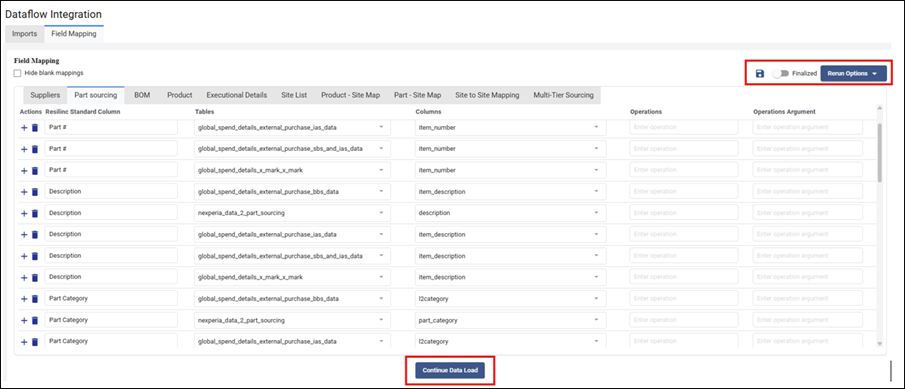
- Your Resilinc contact opens the "Field Mapping" tab in the Dataflow Integration section.
- The AI generates initial predictions for each source file column, suggesting which Resilinc standard field it corresponds to. Mapping is available across all data tabs, including Suppliers, Part Sourcing, BOM, Product, Site List, Product-Site Map, Part-Site Map, Site to Site Mapping, and Multi-Tier Sourcing.
- Your Resilinc contact reviews these predictions and makes any necessary corrections based on what was agreed upon with you.
- If any data transformations are needed (for example, converting a date format, or mapping a risk grade of A/B/C to a numeric scale of 1-10), these are configured in the "Operation" and "Operation arguments" columns.
- Once the mapping is verified and correct, your contact clicks "Save" and then "Continue Data Load" to proceed.
Was this article helpful?
That’s Great!
Thank you for your feedback
Sorry! We couldn't be helpful
Thank you for your feedback
Feedback sent
We appreciate your effort and will try to fix the article