- In the assessment launch process, only the attachments added from the top “Attachments” section (highlighted in yellow in the screenshot) are included and sent to suppliers as part of the kickoff email. These attachments are considered global files for the assessment and are automatically attached when the kickoff notification is triggered.
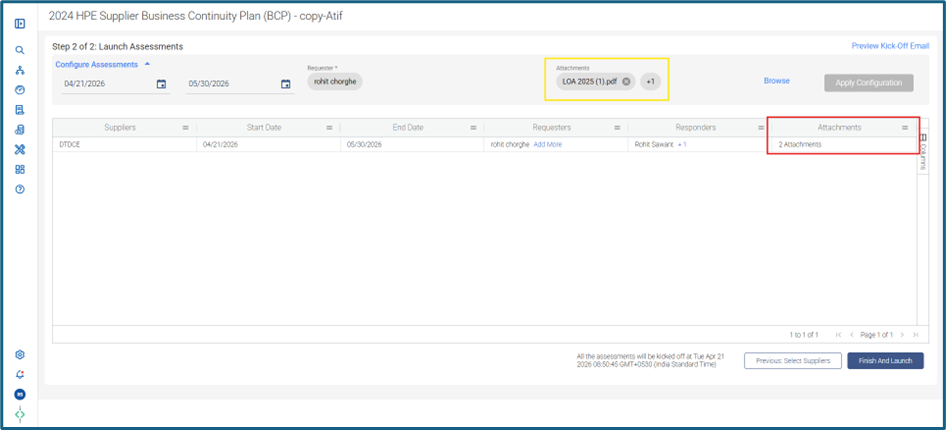
- The Attachments column in the supplier grid (highlighted in red) only reflects the count of the global files that were added through the yellow section. It is just an indicator and does not control which files go out in the Kick‑off email or appear on the supplier portal.
- To ensure that suppliers receive the necessary files and can access them, always upload all required attachments through the yellow‑highlighted global Attachments section. Files added anywhere else will not be delivered in the Kick‑off email and will not be available to suppliers.
Was this article helpful?
That’s Great!
Thank you for your feedback
Sorry! We couldn't be helpful
Thank you for your feedback
Feedback sent
We appreciate your effort and will try to fix the article