- Yes, a company admin user can mark any user as DND (Do Not Disturb) if the user does not want to receive email notifications from Resilinc.
Steps to mark a user as DND
- Log in to the Resilinc Portal
- Navigate to the left-side menu
- Click on Admin -> User Management to visit Manage Users
- Drill down to the Users page
- Search/filter the user
- Toggle ON the DND option from the DND column
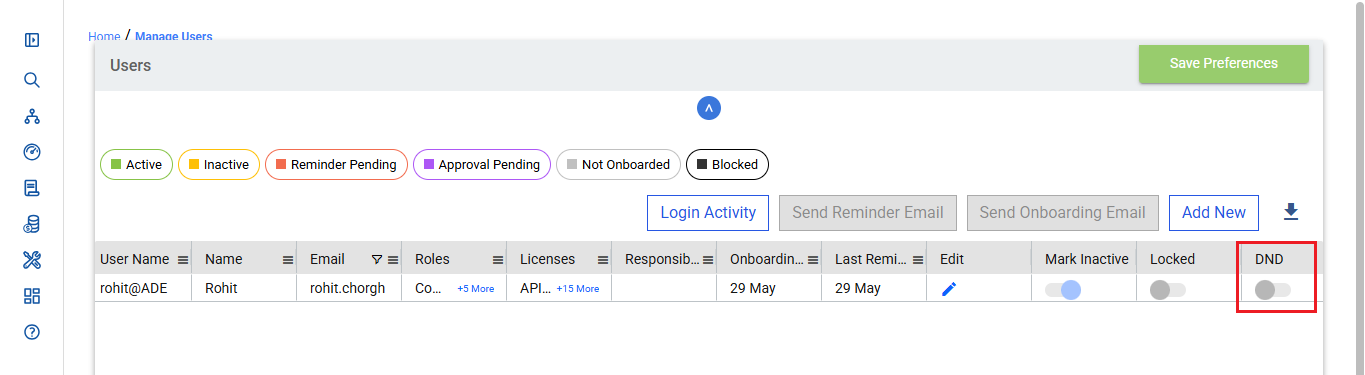
Post Update
- The user will stop receiving all email notifications from Resilinc
Important Notes
- Only admin users can enable or disable DND
- Admins can update DND only for customer users, not supplier users
- If the user wants to receive notifications again, they need to contact their company admin or Resilinc Customer Support team to remove the DND status.
- DND only suppresses email notifications/communications. It does NOT affect login ability or portal data access.
Was this article helpful?
That’s Great!
Thank you for your feedback
Sorry! We couldn't be helpful
Thank you for your feedback
Feedback sent
We appreciate your effort and will try to fix the article