- To view tier-wise risk scores of a supplier, use the Partner Details Dashboard. This dashboard provides a breakdown of the supplier’s risk scores across different supply chain tiers.
Steps to access tier-wise risk scores:
- Hamburger Menu (left-side options) -> Reports & Analytics.
- Search and open the Partner Dashboard.
- Search for the supplier name in the Overall Partner Risk Score grid.
- Click on the supplier name to open the Partner Details Dashboard.
- Navigate to the Risk Analytics section.
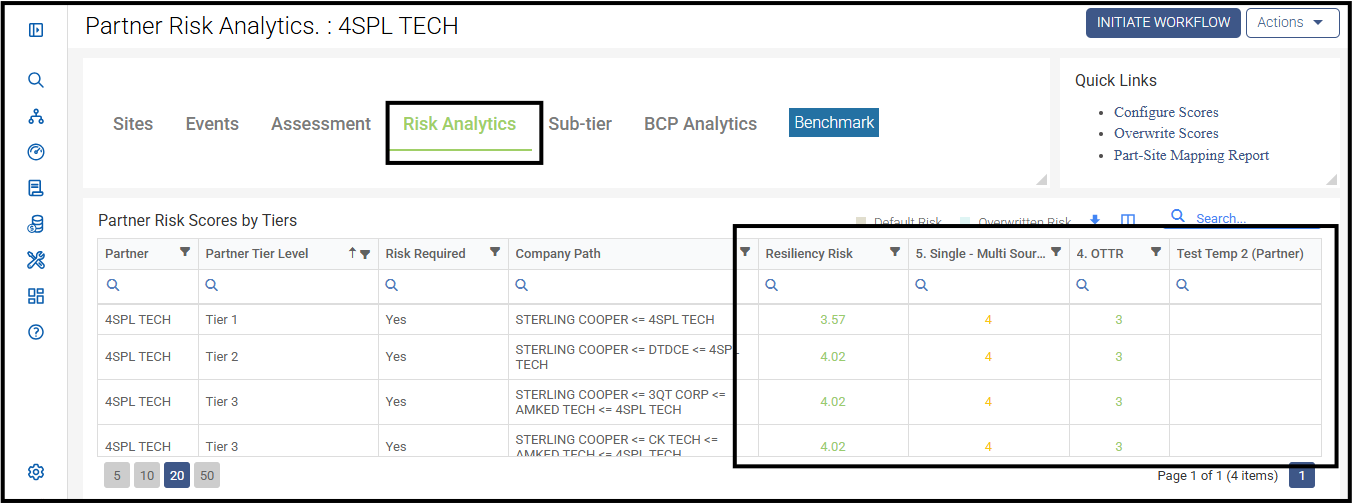
- Locate the grid titled "Partner Risk Scores by Tiers" to compare risk levels across tiers (e.g., Tier 1, Tier 2).
- This view helps you understand how the supplier's risk varies based on their position in the supply chain.
- Refer to the screenshot below for visual guidance.
Was this article helpful?
That’s Great!
Thank you for your feedback
Sorry! We couldn't be helpful
Thank you for your feedback
Feedback sent
We appreciate your effort and will try to fix the article