- On the Track Assessments page, there is a messaging icon in front of each assessment.
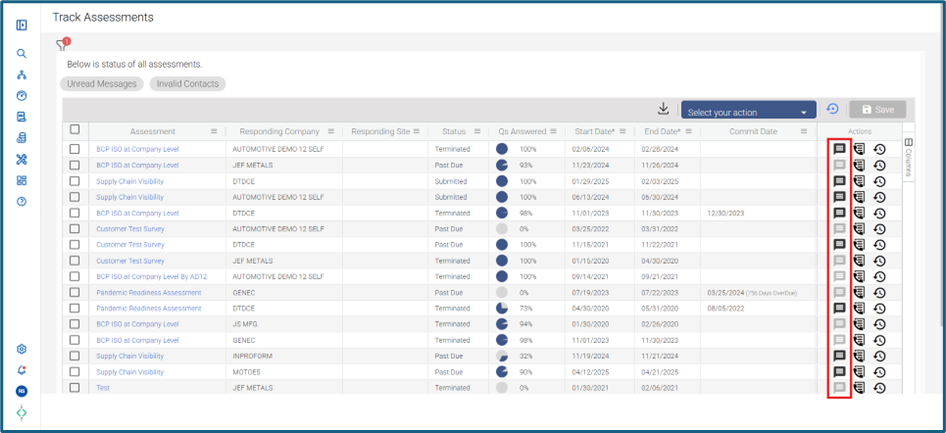
- This can be used to collaborate with suppliers, Resilinc Supplier Success and your colleagues. There will be four channels created for these assessments
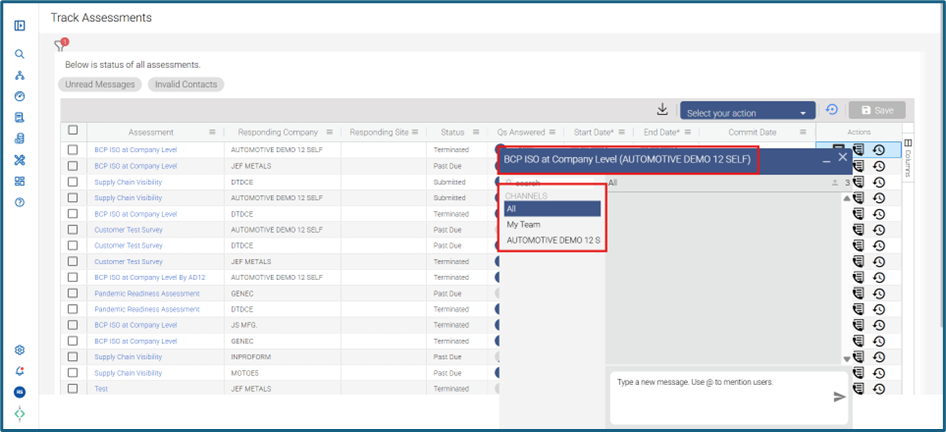
- All channel: Customer can communicate to assessment respondents, Resilinc Supplier Success and any other requestor assigned to that assessment from customer company. All users created in this channel can view and send messages
- My Team channel: This will enable you to interact with your colleagues who have been added as requestor (from your organization) on that assessment
- Supplier Company Name channel: This channel enables you to interact with your assessment respondents from the supplier company
- Resilinc Supplier Success (formerly known as Resilinc Partner Relations): This channel enables you to interact with Supplier Success Specialist from Resilinc assigned to that assessment. The channel is created only when the PR Specialist has been assigned to that assessment
- Collaboration Center can also be used within the Resilinc tool to talk to the suppliers to follow up on assessments.
Was this article helpful?
That’s Great!
Thank you for your feedback
Sorry! We couldn't be helpful
Thank you for your feedback
Feedback sent
We appreciate your effort and will try to fix the article