User can view such relationships using below methods:
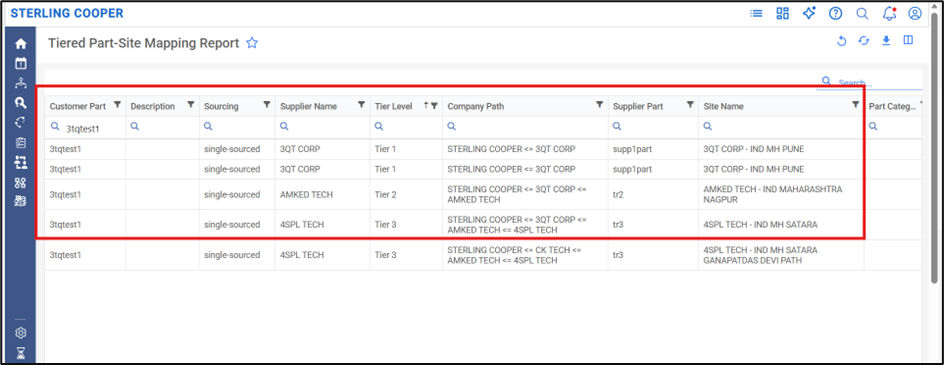
1. Tiered Part-Site Mapping Report:
This report provides a detailed hierarchical view of suppliers and their associated sites.
- The Company Path field shows the complete supplier hierarchy (from Tier 1 to sub-tiers)
- The Site Name field indicates the specific site for each supplier in the chain
By analyzing these fields together, you can identify the Tier 1 supplier (top of the hierarchy) and trace how sub-tier suppliers (Tier 2, Tier 3, etc.) are connected to it, including their respective sites.
2. Material Flow Dashboard:
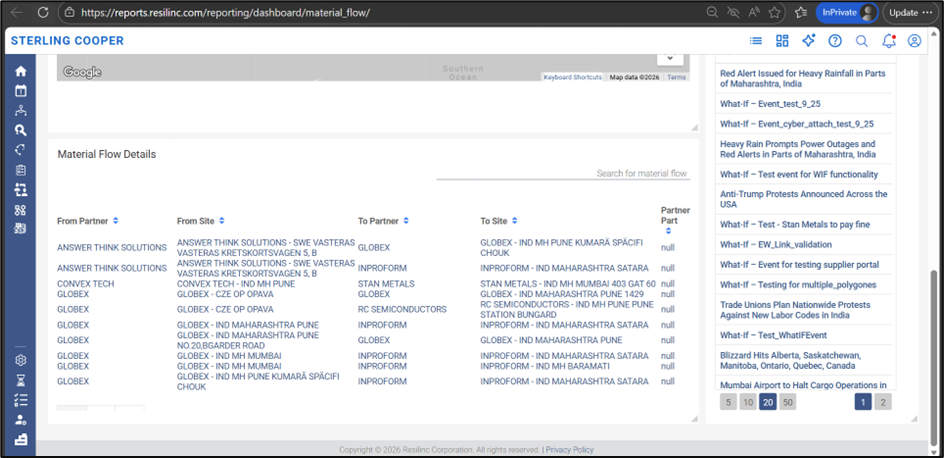
The Material Flow Dashboard offers a visual and relational view of how sites are connected across suppliers.
- It shows the flow from sub-tier suppliers to higher-tier suppliers (including Tier 1)
- The “From Partner/Site” → “To Partner/Site” fields help track how materials move and how sites are linked
Using this dashboard, you can easily trace and validate the connection between sub-tier supplier sites and the Tier 1 supplier site, providing better visibility into the supply chain structure.
These tools together help in clearly identifying and validating Tier 1 site connections across the supplier network.
Was this article helpful?
That’s Great!
Thank you for your feedback
Sorry! We couldn't be helpful
Thank you for your feedback
Feedback sent
We appreciate your effort and will try to fix the article