Purpose
This KB helps support team members identify and resolve a common Autonomous Mapping (AM) job failure in Databricks without immediately escalating to Engineering.
Error Pattern
The AM job fails with an error similar to:
Library installation failed: Library installation attempted on serverless compute and failed. The library file does not exist or the user does not have permission to read the library file. Please check if the library file exists and the user has the right permissions to access the file.
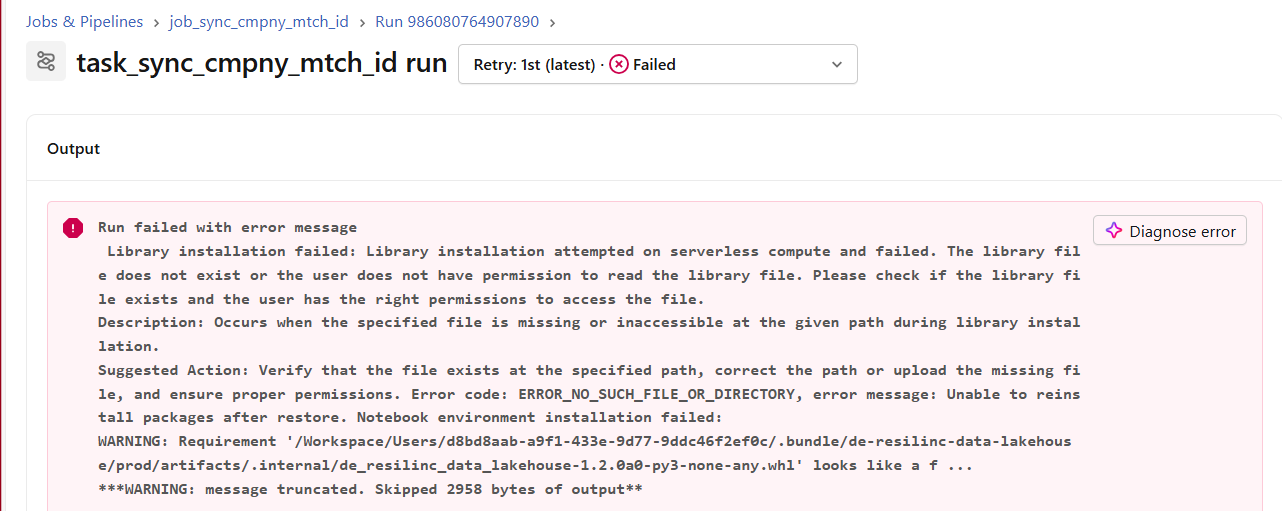
When to Use This KB
Use this KB when:
Its been observed that an Autonomous Mapping refresh/job failed.
The Databricks job log shows the library installation error above.
The failure appears transient and no recent AM configuration changes were made.
Likely Cause
This error is usually caused by a temporary issue while Databricks tries to install a required library on serverless compute. In most cases, rerunning the job resolves the issue.
Resolution Steps
Open the failed Databricks job run
Navigate to the customer’s AM job run in Databricks and open the failed run details.
Verify the error
Confirm that the failure message matches the library installation error shown above.
Rerun the job
Use the Rerun option for the failed job run.
Monitor the rerun until it completes successfully.
Validate completion
Check that the job status changes to Succeeded and the Autonomous Mapping refresh completes as expected.
Important Operational Notes
Always capture the failed job URL
When reporting or documenting a failure, include the direct URL of the failed Databricks job run. This helps Engineering quickly identify the exact run and investigate recurring issues.
Locate the actual failed job
In Databricks, open the Jobs section and identify the specific job run that failed. Share that run link rather than a generic workspace link.
When to escalate
Escalate to Engineering if:
The rerun fails again with the same error.
Multiple customers experience the issue simultaneously.
The error changes from the library installation message to a different failure type.
The required library path/file is genuinely missing or permissions appear incorrect.
Was this article helpful?
That’s Great!
Thank you for your feedback
Sorry! We couldn't be helpful
Thank you for your feedback
Feedback sent
We appreciate your effort and will try to fix the article