- The Rapid Rating third-party risk scores can be removed from the backend by our Data Ops team.
- As a workaround, users can also remove the Rapid Rating risk factor configuration directly from the Risk Settings page by following the below steps:
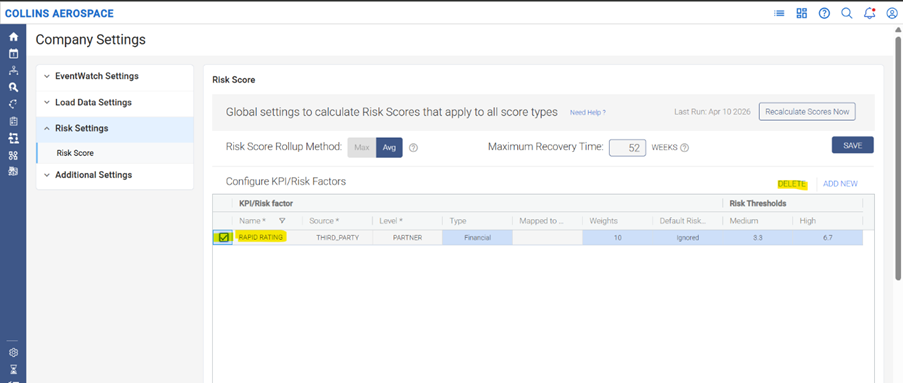
- Navigate to Company Settings → Risk Settings → Risk Score.
- Under Configure KPI/Risk Factors, locate the name of the risk factor (for example: Rapid Rating).
- Select the checkbox next to that risk factor.
- Click DELETE to remove the risk factor configuration.
- Save the changes, if prompted.
- Once removed, the particular third party scores will no longer be considered in the configured risk scoring setup.
- If a complete backend removal is required, please reach out to the Support team to coordinate with the Data team.
Was this article helpful?
That’s Great!
Thank you for your feedback
Sorry! We couldn't be helpful
Thank you for your feedback
Feedback sent
We appreciate your effort and will try to fix the article