Introduction
- User Defined Attributes (UDAs) empower customers to add custom fields to suppliers and sites within Resilinc, enabling enhanced classification and management of supply chain data. Recent improvements in the platform offer flexible methods for managing UDAs—allowing manual updates or automated ingestion based on your business needs.
Managing UDAs: Available Methods
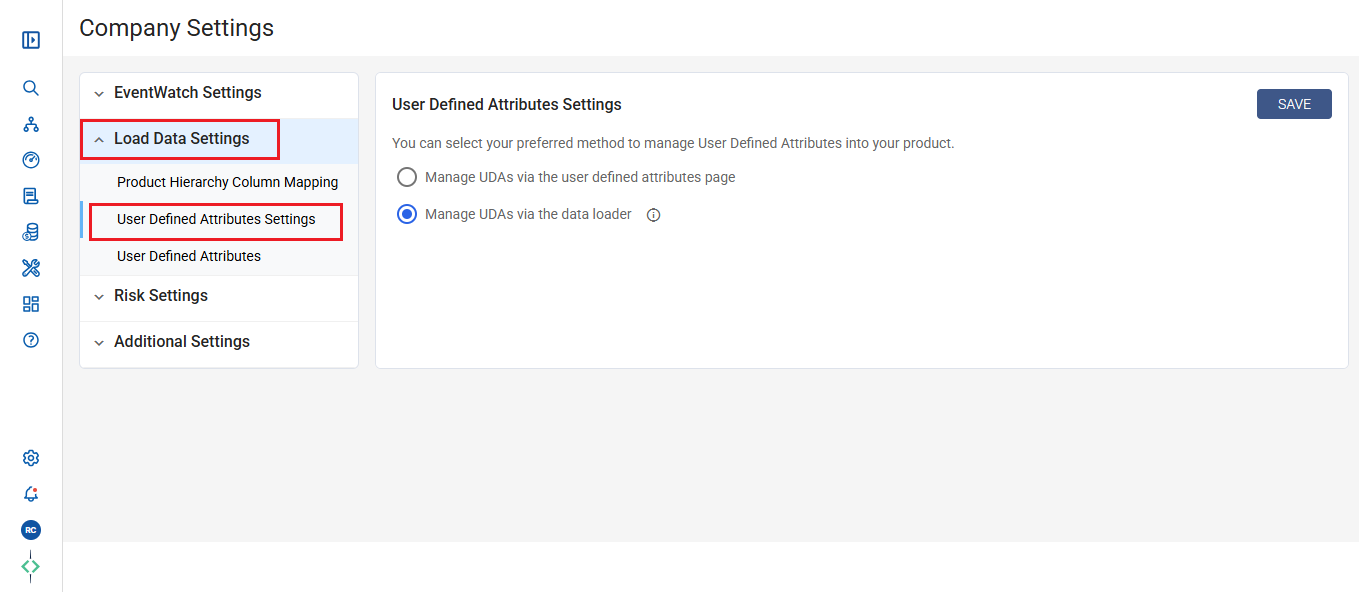
As shown in the screenshot below, you can select your preferred method to manage UDAs for your product:
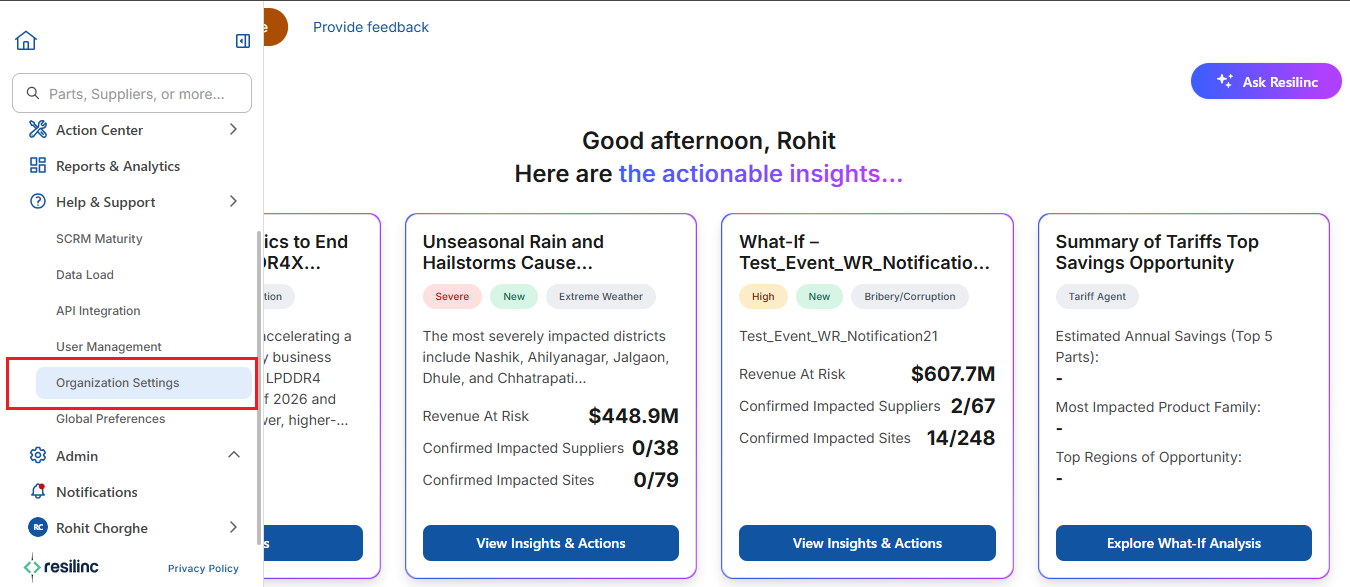
Navigation Path -> Left Hamburger Menu -> Admin -> Organization Settings -> Company Settings -> Load Data Settings -> User Defined Attributes Settings
1) Manage UDAs via the User Defined Attributes Page:
- Description:
- Use the portal interface to create, edit, import, export, or delete UDAs directly from the dedicated User Defined Attributes page.
- Best for:
- Users who require dynamic updates or ad hoc changes without automation.
- Note:
- If portal UI import is active, data loader-based UDA import is disabled to avoid synchronization conflicts.
2) Manage UDAs via the Data Loader:
- This method further splits into two approaches (both considered “Data Loader” methods):
a) CDIF (Customer Data Input File):
- Upload a formatted Excel file (CDIF), placing UDA columns (prefixed with “UDA_”) on specific tabs (Supplier and Sites).
- UDA name is defined after the prefix (e.g., “UDA_Procurement_Manager”).
- Reserved UDA keys (such as supplier categories) cannot be ingested.
- Uploading the CDIF processes and integrates UDAs automatically.
b) Data Load Automation (DLA) via SFTP:
- Upload raw data files containing UDA columns (prefixed with “UDA_”) using automated SFTP transfers.
- This enables scheduled, unattended updates for UDAs.
- Collaboration with Resilinc Support ensures correct mapping and processing.
Important Notes:
- Only one method can be active at a time to prevent data conflicts.
- If you choose data loader automation, portal UI imports for UDAs are disabled.
Best Practice Recommendations:
- For regular, structured updates: Use the automated data loader methods (CDIF or SFTP) to streamline UDA ingestion.
- For ad hoc or single updates: Use the portal page for easy manual management.
- Confirm your selection on the Data Load Settings page to ensure alignment with your operational needs.
Was this article helpful?
That’s Great!
Thank you for your feedback
Sorry! We couldn't be helpful
Thank you for your feedback
Feedback sent
We appreciate your effort and will try to fix the article