- Yes, users with the Company Admin role can verify if Tab 10. Multi-Tier Source is enabled by following below steps:
- Click on the Hamburger Menu Icon: Navigate to Admin -> User Management
- Expand Options: Click on the blue down arrow to reveal additional options.
- Navigate to "Product Details": Select this option.
- Check "Data Load Product": On the Product Details page, ensure that the tier is set to PREMIUM and includes "Multi-Tier Data Load."
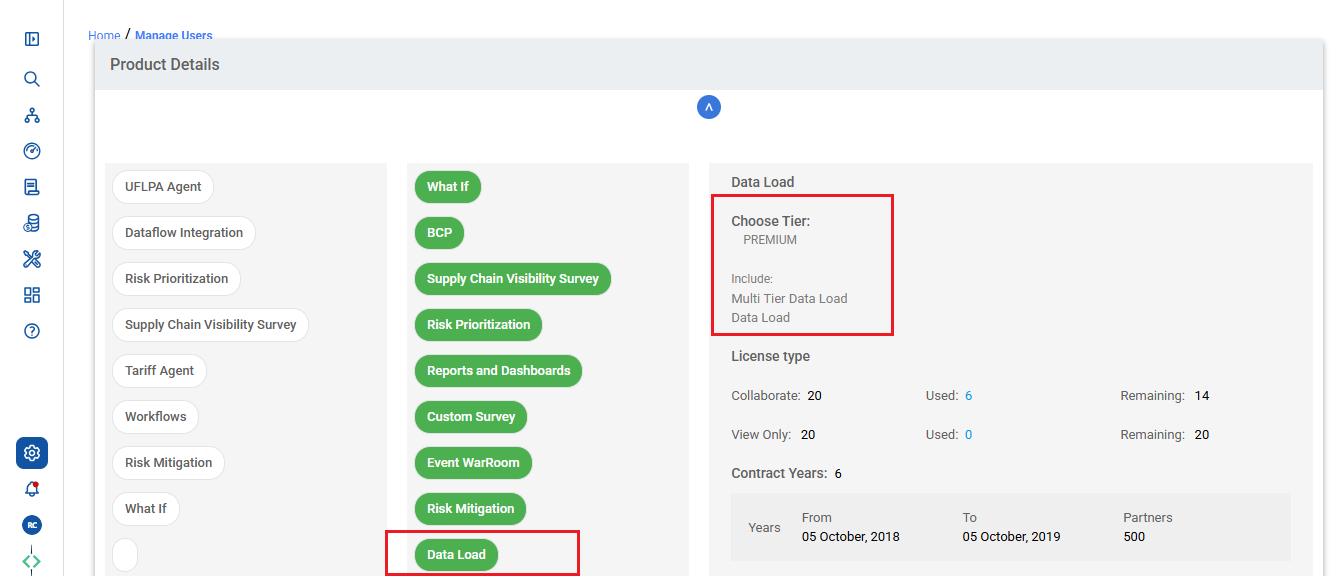
- This path allows Company Admins to confirm whether the organization is enabled for Tab 10. Multi-Tier Source.
Was this article helpful?
That’s Great!
Thank you for your feedback
Sorry! We couldn't be helpful
Thank you for your feedback
Feedback sent
We appreciate your effort and will try to fix the article