- The "Monthly View of Average Time to Confirm Impact (Last 18 Months)" chart on the EventWatch Response KPI dashboard displays a monthly breakdown of supplier response activity and average response time related to EventWatch alerts.
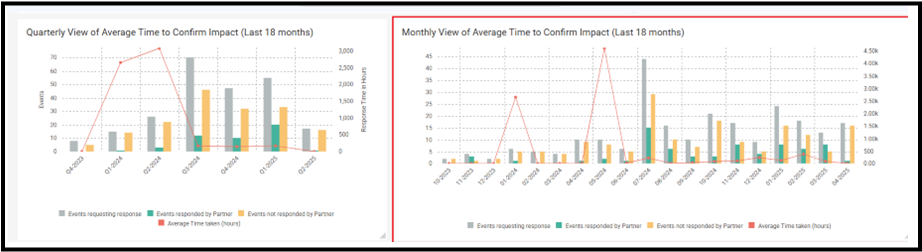
- The chart visualizes the following data points for each month over the past 18 months:
- Events Requesting Response (Gray Bar): Total number of events for which a response was requested from suppliers.
- Events Responded by Partner (Green Bar): Number of events where the supplier responded with impact confirmation.
- Events Not Responded by Partner (Orange Bar): Number of events where the supplier did not respond.
- Average Time Taken (Hours) (Red Line): The average time, in hours, taken by suppliers to confirm the impact for events responded to in that month.
- This chart helps customers monitor supplier responsiveness over time and identify trends in average confirmation time.
- To analyze the data in more detail, users can refer to the Event Response KPI Master Data Report available below the chart, which supports exporting to Excel for offline review.
Was this article helpful?
That’s Great!
Thank you for your feedback
Sorry! We couldn't be helpful
Thank you for your feedback
Feedback sent
We appreciate your effort and will try to fix the article