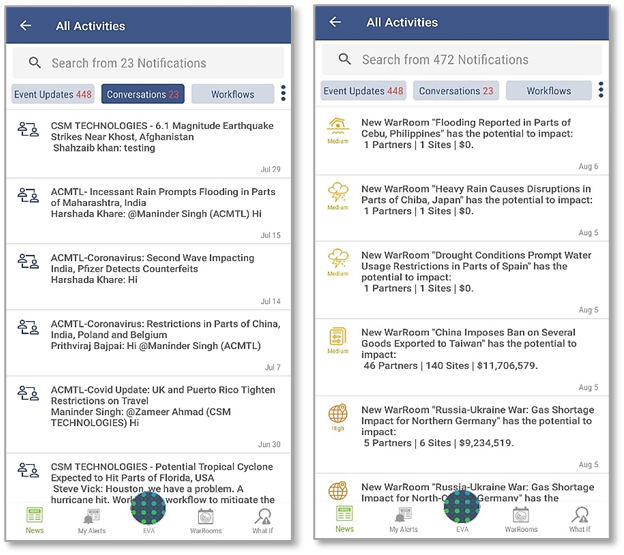
- Activities & Notifications: The bell icon compiles of the activities and notifications sent to the user. These notifications are classified under Event Updates, Conversations from Collaboration Center, and Workflow actions. Users can review and close all of the open notifications or take required actions such as updating the WarRoom status and severity, as well as responding to collaboration chats and updating Workflow actions.
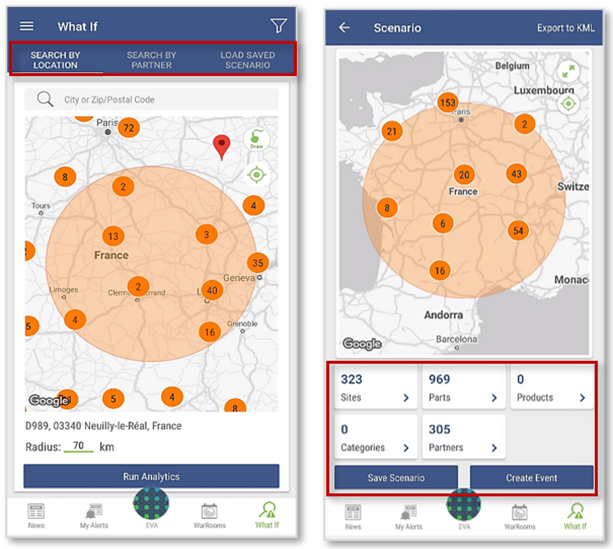
- Analyze What-If: Similar to the desktop environment, Analyze What-If is the scenario planning capability that helps users simulate scenarios based on private information they may have about an upcoming event. The mobile app offers proactive risk identification capability to users with easy access to critical supplier information, scenario creation, and risk analysis. The risk scenarios can be saved using the mobile application and can be shared as Events with the other users within the same company. Scenarios saved in the mobile app can be accessed later, on the desktop as well. Some of the common use cases for the desktop and mobile platform are listed in the same document in the section titled Analyze What-If
Workflow:
The objective of the mobile application is to alert users about any risk on the go. While notifications are important, it is crucial that risk teams can take action. Workflow is a comprehensive task manager which can help risk teams to create mitigation projects using event information. This allows risk teams to effectively delegate tasks to team members. Additionally, risk teams can track action items and collaborate with one another to close the tasks.
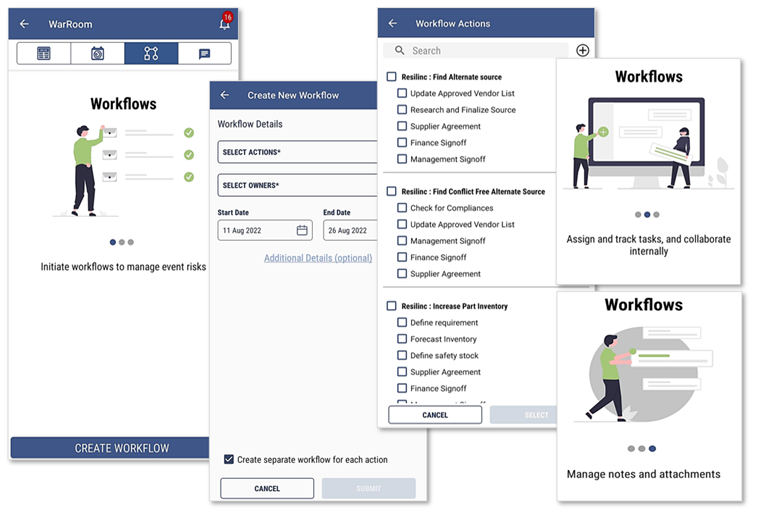 E.g., While away on business travel, a risk manager notices an event which may have significant impact on the company’s supply chain, and he/she wants the team to work on certain action items to mitigate the risk associated with that event. Workflow function on the mobile application makes this easier, as the risk manager can now create an action plan (Playbook) and assign action items to one or more team members with detailed instructions. As soon as the workflow project is initiated, the users will receive a notification informing them of their task. The risk manager can assign timelines to the action plan and track progress of the actions as well as collaborate on the mobile chat.
Was this article helpful?
That’s Great!
Thank you for your feedback
Sorry! We couldn't be helpful
Thank you for your feedback
Feedback sent
We appreciate your effort and will try to fix the article