‘Create Assessments’ option offers range of features to create a user defined assessment and store it in the Resilinc portal. It also provides access to a list of assessments present in the Resilinc library for users to edit or clone.
Use Case - Depending on the organization’s SCRM requirements, a custom assessment can be designed by the users. Customers can design custom assessments to solicit information from suppliers regarding long term events such as COVID-19 preparedness, hurricane preparedness or the Russia – Ukraine War. These situational assessments help customers collect critical information from suppliers to proactively plan business continuity.
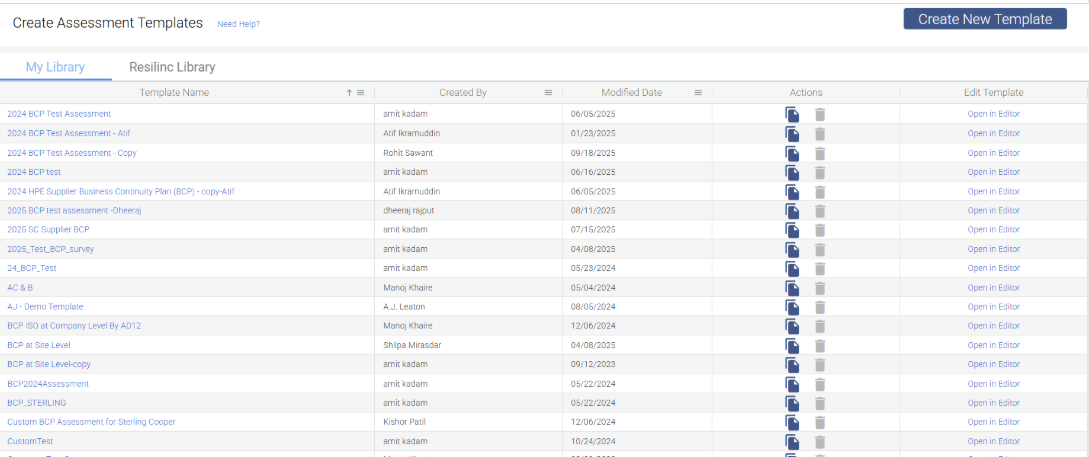
Below are few options available in the create assessment section:
- Clone - Users can create a new assessment template by cloning an existing assessment from the library. The assessments can be re-named, modified by adding & removing questions, or entire sections, and users can also change the weights & points etc.
Use Case –
- Companies can choose to amend existing assessments if they find questions or sections within the assessments irrelevant, or if they need to add more questions or sections to the assessment.
- Additionally, customers can choose to make certain question mandatory or non-mandatory.
- Multiple choice questions can also be modified according to the responses users would like to be available.
- Users may also assign different weights and point values to certain questions and answers to ensure the assessment represents the risk as accurately as possible.
- Open in Editor - The customizations to any chosen survey template are made in the editor window. Any changes made to templates here will reflect in all active and submitted assessments.
Recommendations & important points to note:
- Making changes to the existing Resilinc assessments can result in breaking the assessment shareability model.
- What is Resilinc Data Shareability Model?
Resilinc assessments follow a data shareability model which helps customers to leverage supplier information. For example, Supplier ABC has completed a BCP assessment requested by their Customer XYZ last month. This month Jupiter Technology has requested the same assessment from supplier ABC. When Supplier ABC receives a request for the same assessment, they will be given the option to share their previous responses they supplied to Customer XYZ. The shareability model reduces supplier efforts and increases the response rate towards the assessments. - Resilinc does not recommend making changes to any assessment templates which are launched or submitted by their suppliers, as this may affect the result or output of the existing assessment. Customers can have a thorough discussion about their requirements with their Customer Success Manager.
- Delete - Users can delete an existing assessment they have created. Users cannot delete any assessment from the Resilinc Library or assessments created by other users. Additionally, users cannot delete an assessment which has already been submitted to suppliers.
Was this article helpful?
That’s Great!
Thank you for your feedback
Sorry! We couldn't be helpful
Thank you for your feedback
Feedback sent
We appreciate your effort and will try to fix the article