Overview:
Resilinc now enables customers to create Workflows programmatically using REST APIs.
This capability brings full parity with the Workflow creation experience available in the Resilinc UI, allowing seamless automation, integration with enterprise systems, and large‑scale workflow orchestration.
Using the Workflow creation API, customers can:
- Create one or multiple workflows in a single API call
- Build workflows for Events, Partners (Suppliers), Sites, and Customer Part Numbers (CPNs)
- Use any valid combination of entities (Event + Partner, Partner + Site + CPN, etc.)
- Include custom attributes, playbook actions, workflow owners, and dates
- Achieve 100% parity with UI‑created workflows
This article outlines the supported scenarios, helper endpoints, prerequisites and step‑by‑step instructions for creating workflows using the POST method.
# Supported Workflow Combinations:
Workflows can be created for the following entity combinations:
Events
- Event only
- Event + Partner
- Event + Partner + Site
- Event + Partner + Site + CPN
- Event + Site
- Event + Site + CPN
- Event + CPN
Partners
- Partner only
- Partner + Site
- Partner + Site + CPN
- Partner + CPN
Sites
- Site only
- Site + CPN
Parts
- CPN only
# Helper Endpoints
Before creating a workflow, use the following endpoints to retrieve required metadata:
Endpoint | Description |
GET /workflow/users | Retrieves all Workflow Owners (Owner ID, full name, email) |
GET /custom_attributes | Returns all custom elements defined for Events, Partners, Sites, and Parts, including type, label, values, and column_key |
GET /playbooks | Retrieves available playbooks and their associated actions |
Partner/Site/Event/CPN endpoints | Retrieve entity IDs required for workflow creation |
These endpoints ensure that all IDs and metadata used in the workflow payload are accurate and up to date.
# Prerequisites
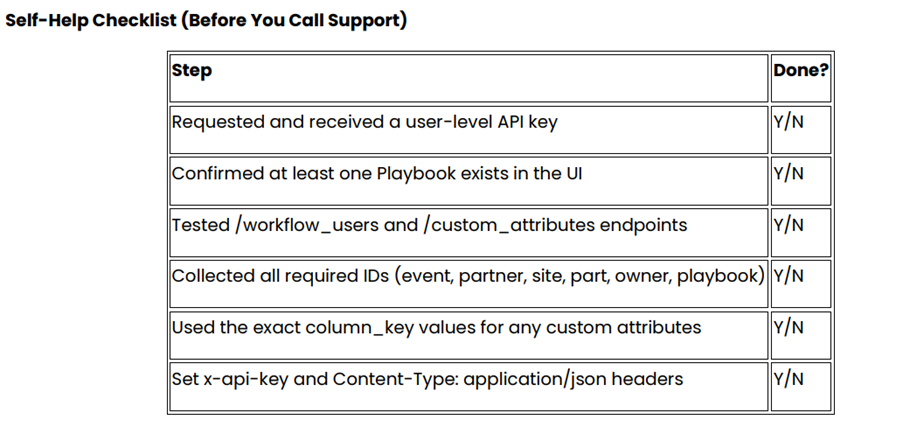
Before calling the Workflow creation API, ensure the following:
- You have a user‑level API key (different from tenant‑level key)
- At least one playbook exists in the UI
- You have retrieved all required IDs (event, partner, site, part, owner, playbook)
- You have tested /workflow_users and /custom_attributes endpoints
- You use exact column_key values for custom attributes
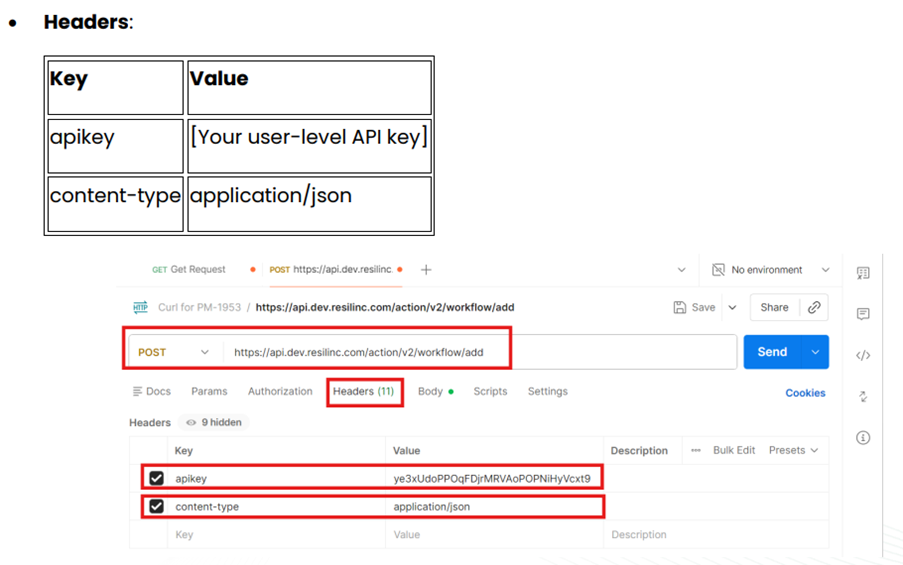
- You set the required headers:
- x-api-key: <your user-level API key>
- Content-Type: application/json
Step-by-Step Guide to Creating a Workflow
Step 1: Retrieve Supplier/Partner ID
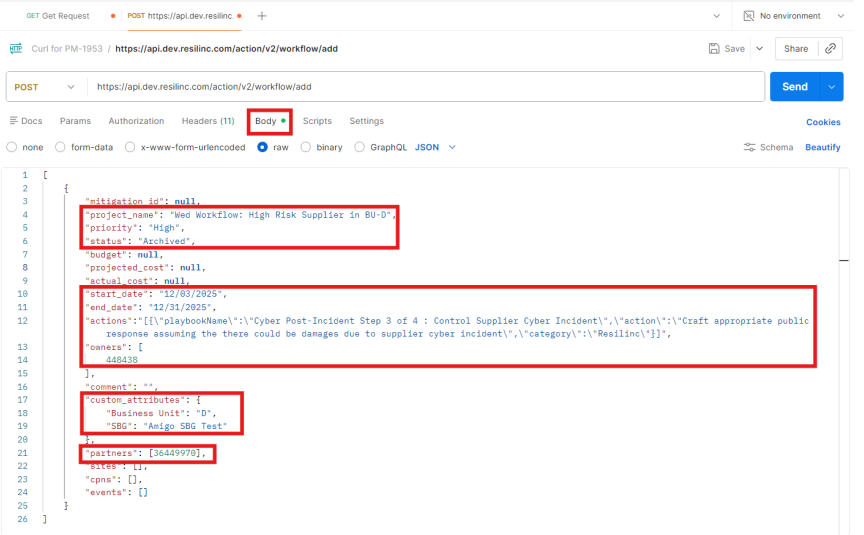
Use the appropriate Partner endpoint (e.g., partner_risks) to obtain the Supplier ID. Example: Copious IT Services → Supplier ID: 36449970
Step 2: Retrieve Workflow Owner ID
Use the endpoint:
GET /workflow_users
This returns the list of users eligible to be workflow owners.
Step 3: Obtain User-Level API Key
Request your user-level API key by raising a support ticket. This key ensures auditability—each workflow is tied to the user who created it.
Step 4: Retrieve Playbook Actions
Use the playbooks endpoint to extract:
- Playbook name
- Actions
- Category
These must be included in the workflow payload.
Step 5 (Optional): Retrieve Custom Attributes
If your tenant uses custom workflow elements, call:
GET /custom_attributes
This returns:
- Column names
- Dropdown values
- Free-text fields
- column_key values
Include these in the custom_attributes section of the payload.
Step 6: Create the Workflow (POST Method)
Endpoint
POST /workflows
or
POST /workflows/bulk
(same payload, but accepts an array)
 Payload Structure
Below is a representative payload structure:
 Security Best Practices
- Always transmit API calls over HTTPS
- Store API keys using secure vaults or environment variables
- Apply least‑privilege access to API keys
- Never embed API keys directly in code repositories
Value to Customers
By leveraging the Workflow creation API, customers can:
- Automate workflow creation when new events are detected
- Onboard suppliers, sites, and parts with preconfigured workflows instantly
- Integrate Resilinc workflows with internal ticketing or orchestration systems
- Scale risk management programs efficiently
- Maintain consistent workflow structures across large datasets
Was this article helpful?
That’s Great!
Thank you for your feedback
Sorry! We couldn't be helpful
Thank you for your feedback
Feedback sent
We appreciate your effort and will try to fix the article