- If a user wants to receive WarRoom notifications for their entire supply chain—including newly added suppliers—they do not need to manually update their EventWatch preferences every time new suppliers are onboarded.
- To enable notifications for all current and future suppliers, the user should simply leave all suppliers unselected on their personal preferences and notification settings page as per the below screenshot.
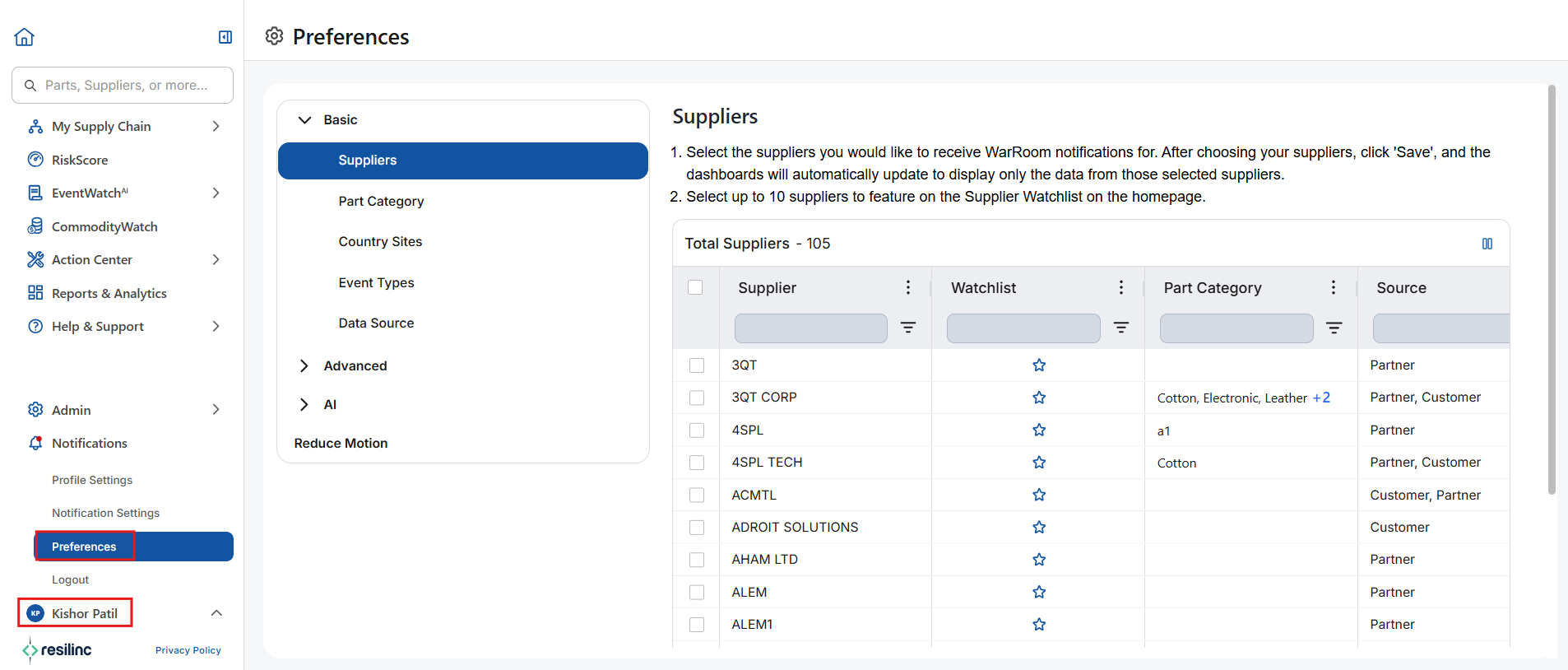
- When no supplier-specific filters are applied, the system automatically sends WarRoom notifications for every supplier across all tiers.
- Any newly added supplier to the portal will also have this setting unselected and will receive notification.
- Alternatively, if the user selects specific suppliers in their EventWatch preferences, notifications will be restricted only to the suppliers they have chosen. In this case, they would need to manually update their settings whenever new suppliers are added to ensure those suppliers are included in future notifications.
- Choosing between these two approaches allows users to control whether they receive notifications for all suppliers or only a specific subset based on their preferences.
Was this article helpful?
That’s Great!
Thank you for your feedback
Sorry! We couldn't be helpful
Thank you for your feedback
Feedback sent
We appreciate your effort and will try to fix the article