- Yes, you can now upload User-Defined Attributes (UDAs) to the Customer Part level.
- Just as you classify suppliers and sites with your own custom attributes, you can now add/attach your own business dimensions — such as business unit, category manager, plant, or product family — directly to your customer parts.
- This lets you organize, segment, and filter your part portfolio using the vocabulary your organization already uses internally.
How to upload part-level UDAs:
- Part-level UDAs are ingested exclusively through Dataflow Integration (DFI).
- Unlike Supplier and Site UDAs — which can be managed via the UI, CDIF, or DLA — Part UDAs are supported through DFI only.
- The UI / data-loader setting under Settings → Load Data → User Defined Attributes governs Supplier and Site UDAs only; it does not affect how part-level UDAs are ingested.
- Part UDAs sent through any non-DFI path (CDIF or DLA) will not be processed.
Where you'll see them:
Part-level UDAs appear on the Customer Part Listing Page as filterable columns. You can:
- Upload your part-level UDAs as columns on the grid
- Filter the page by one or more UDA values to narrow the view to exactly the parts you care about
- Combine UDA filters with existing part fields to segment your portfolio (for example, isolate the parts owned by a single business unit, or view only the parts assigned to a specific category manager)
Currently part-level UDAs are surfaced as columns and column-level filters on the Customer Part Listing Page.
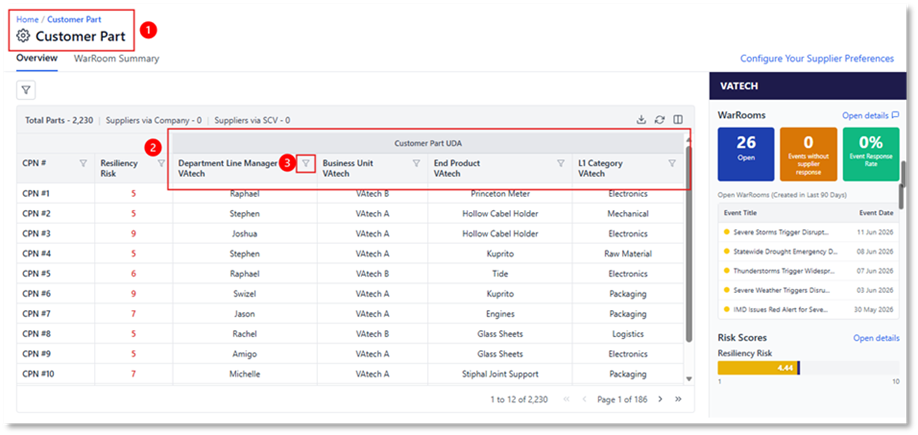
- Part UDAs configured via Dataflow Integration (DFI) are displayed only on the ‘Customer Part Listing’ page.
- Part UDAs show up similarly to how supplier and site UDAs are displayed on their respective listing pages
- Currently, filtering is only accessible via the ‘UDA columns.
Was this article helpful?
That’s Great!
Thank you for your feedback
Sorry! We couldn't be helpful
Thank you for your feedback
Feedback sent
We appreciate your effort and will try to fix the article