You can now upload your supply chain data files directly into Resilinc through a drag and drop interface inside Dataflow Integration. No SFTP configuration, no Databricks identifier, no engineering involvement. Select your files, choose how you want the data loaded, and Resilinc handles the rest.
Feature Highlights:
- File Upload is a one-time action. There is no recurring schedule for drag and drop dataflows. If you need to upload updated data use SFTP or Databricks Delta Share for automated recurring ingestion.
- Validation happens before submission. Files that exceed 50 MB or use unsupported formats are flagged inline before the upload begins — you will never reach a failed state because of a file format issue.
- Multiple files in one dataflow. You can upload multiple files in a single Browse Files dataflow. All files are processed together as one ingestion event and appear as a single row in the registry.
- The Resilinc SFTP and Databricks Delta Share options leverage existing dataflow workflows and adhere to Resilinc’s established design patterns, ensuring a familiar user experience and consistency with the current design system.
- The File Upload option introduces a new, streamlined workflow that is fully contained within the side panel, allowing users to complete the entire import journey without navigating away from the current screen.
Benefits to customers using this method:
- Uploading data into Resilinc requires either SFTP credentials configured by your Resilinc implementation team or a Databricks environment connected via Delta Share. Neither option was available to customers who needed to load data quickly, on a one-off basis, or without technical infrastructure in place.
- File Upload removes that dependency entirely. Any user with access to Dataflow Integration can now load supplier, site, part, BOM, or any other Resilinc-supported entity data by dragging files from their desktop with no external tooling and no support ticket.
- This is particularly valuable during onboarding, when data corrections need to be applied quickly, or when a team member needs to load a one-time data export from an internal system that is not connected to Resilinc's automated ingestion methods.
Screenshots:
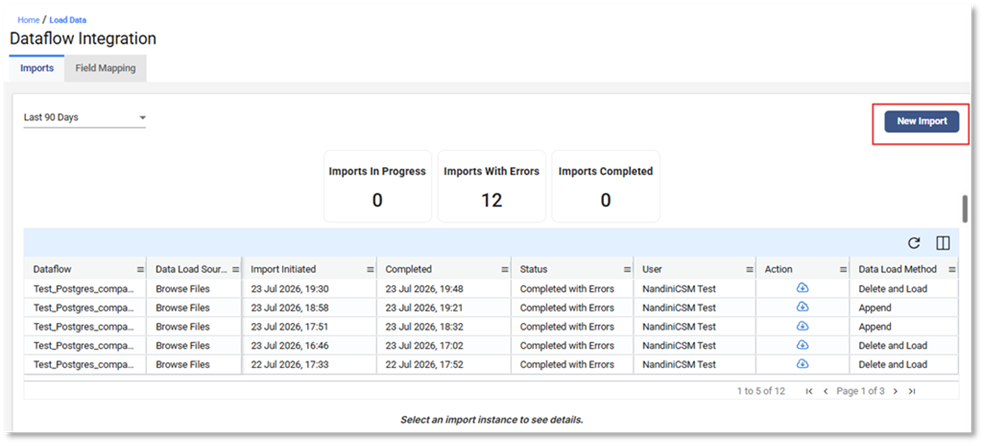
Start by accessing this page via the path login => Left Menu => Admin => Data Flow Integration => New Import
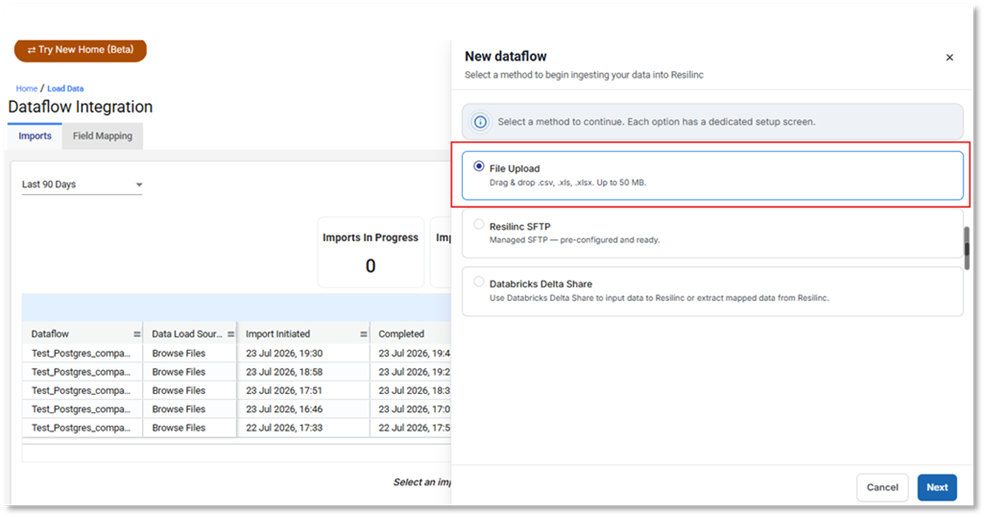
Clicking ‘New Import’ now opens a side panel that presents users with three import options:
- File Upload
- Resilinc SFTP
- Databricks Delta Share
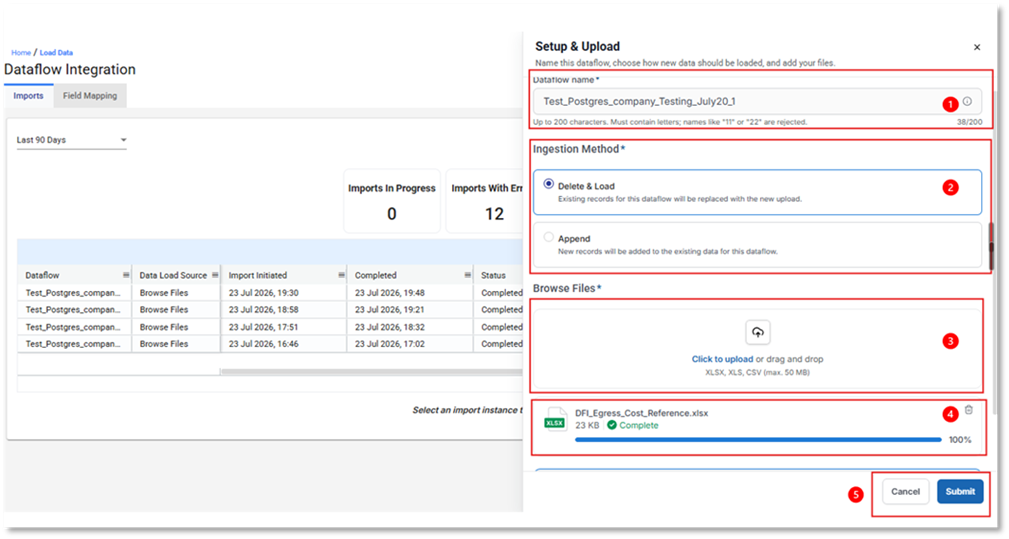
File Upload Workflow
- Enter a Dataflow Name: When File Upload is selected as the ingestion method, the user must first provide a Dataflow Name.
- Select an Ingestion Mode: The user must choose one of the following ingestion modes:
- Delete & Load – Replaces all existing data with the uploaded dataset.
- Append – Adds the uploaded data to the existing dataset.
These options align with the standard load behaviors currently available in Data Load and DLA Uploads.
3. Upload Files
Users can upload files by either:
- Browsing and selecting files from their local machine, or
- Dragging and dropping one or more files directly into the side panel.
The system supports uploading an unlimited number of files. Each file must not exceed 50 MB in size. Supported file formats include .xlsx, and .csv.
4. Manage Uploaded Files
Uploaded files are displayed within the side panel and can be managed directly from the upload interface. Users may remove an uploaded file at any time by clicking the Delete (Bin) icon associated with the file upload card.
5. Submit the Dataflow
Once all required files have been uploaded and the configuration is complete, the user can initiate processing by clicking the Submit button.
Was this article helpful?
That’s Great!
Thank you for your feedback
Sorry! We couldn't be helpful
Thank you for your feedback
Feedback sent
We appreciate your effort and will try to fix the article