Yes. Supplier Impact Confirmation (SIC) remains active even if no suppliers are explicitly selected from the supplier selection list, provided that the SIC configuration settings are enabled.
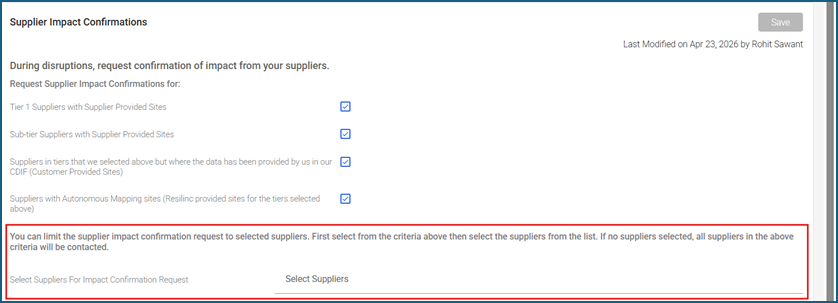
How SIC Configuration Works
- Under the Supplier Impact Confirmations settings, users can enable SIC by selecting one or more of the available criteria such as:
- Tier 1 Suppliers with Supplier Provided Sites
- Sub-tier Suppliers with Supplier Provided Sites
- Suppliers with Customer Provided Sites (CDIF)
- Suppliers with Autonomous Mapping Sites
- These checkbox selections determine the supplier population eligible for SIC requests.
What Happens If No Suppliers Are Selected?
- The “Select Suppliers for Impact Confirmation Request” field is optional.
- If:
- SIC criteria checkboxes are enabled, and
- No suppliers are selected from the supplier list,
- then the system will automatically send SIC requests to all suppliers matching the configured criteria.
Purpose of the Supplier Selection List
- The supplier selection list is used only to narrow or restrict the supplier population receiving SIC emails.
- Users can use this field when they want SIC notifications sent only to specific suppliers instead of all qualifying suppliers.
System Behaviour Summary
| Configuration | SIC Behavior |
|
|
|
|
|
|
Important Note
- Leaving the supplier selection field blank does not disable SIC functionality.
- As long as the SIC criteria checkboxes are enabled and saved, SIC requests will continue to be generated for all matching suppliers.
Was this article helpful?
That’s Great!
Thank you for your feedback
Sorry! We couldn't be helpful
Thank you for your feedback
Feedback sent
We appreciate your effort and will try to fix the article