- Yes. A new Data Source Filter is now available in Personal Preferences Settings to choose which sources trigger WarRoom notifications:
- Customer (CDIF)
- Supplier (SCV)
- Resilinc (AI Mapping)
- Please find the screen below:
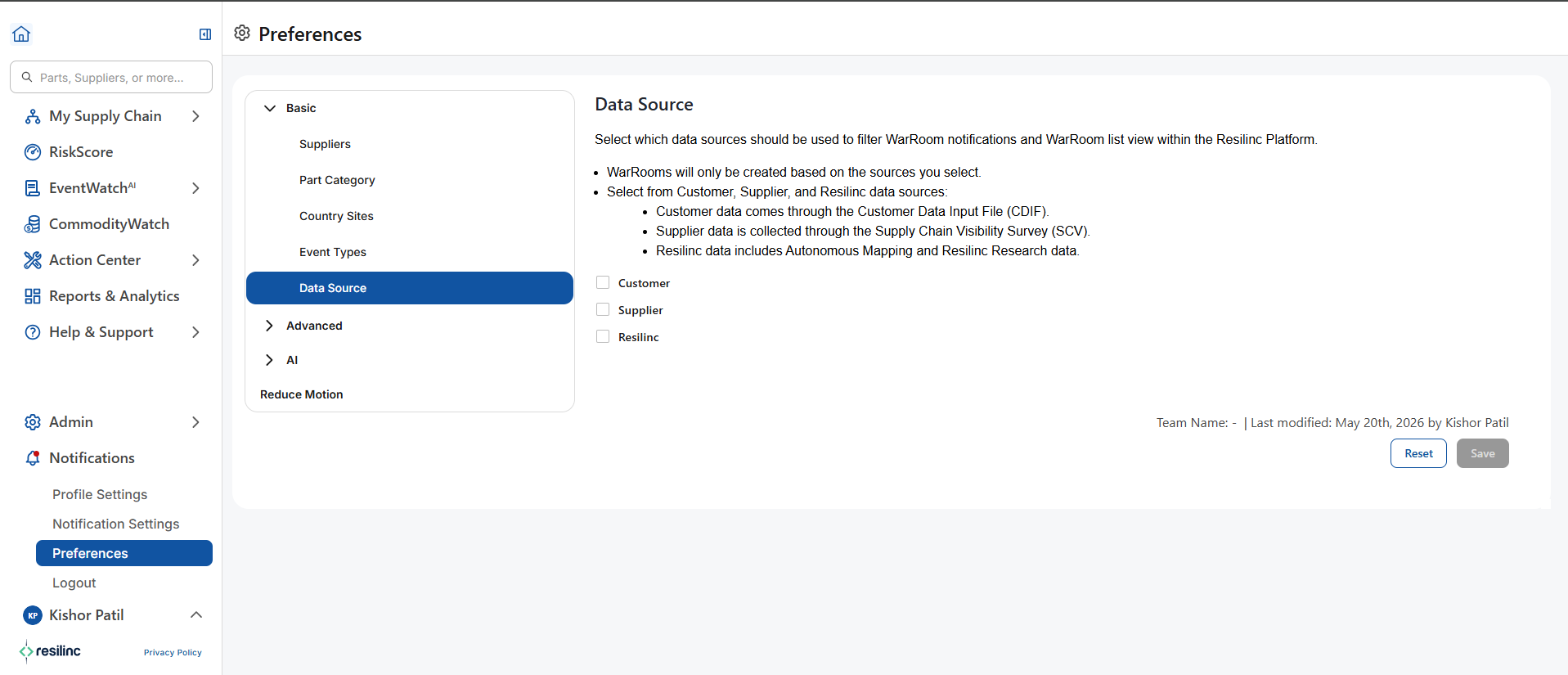
- Note: There is a dependency rule applied on this data source setting.
- If Partner or Resilinc source is selected, Customer source will be automatically selected. Based on this dependency, you will receive WarRoom notifications like:
- Customer + Partner source data
- Customer + Resilinc source data
- Only Customer source data
(Same logic applies to the portal view.) - Customer source cannot be deselected as long as Partner or Resilinc source is selected.
- If Partner or Resilinc source is deselected, Customer source remains selected, but the user can manually remove it.
- If Partner or Resilinc source is selected, Customer source will be automatically selected. Based on this dependency, you will receive WarRoom notifications like:
- Key Features:
- Available on both web and mobile platforms
- Filter is located on the left-side panel of the WarRoom listing page
- Helps users stay focused on relevant WarRooms by excluding unnecessary notifications
- Reduces email clutter and improves usability.
Was this article helpful?
That’s Great!
Thank you for your feedback
Sorry! We couldn't be helpful
Thank you for your feedback
Feedback sent
We appreciate your effort and will try to fix the article