- Suppliers can add upto 250 characters in the comment section while responding to an event.
- Customer users can also update the comment section for a supplier directly from their WarRoom.
- From the HomePage WarRooms tab, customer needs to open an event for which they want to update their supplier response. On the Impact Details tab of an event, customer can update the Impact Status along with comment. They need to click on pencil icon in front of the Impact Status or Impact Duration. Users can provide the comments on the popup window .
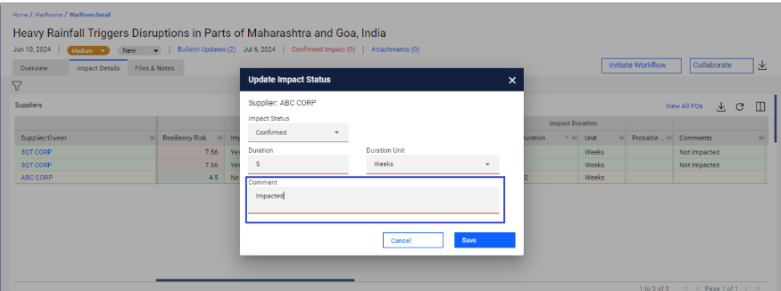
- Customers can add upto 255 characters in the comment section while updating the Impact Status.
Was this article helpful?
That’s Great!
Thank you for your feedback
Sorry! We couldn't be helpful
Thank you for your feedback
Feedback sent
We appreciate your effort and will try to fix the article