Yes, workflows support custom defined elements that can be configured to match your organization's specific tracking and reporting needs.
Overview
- Custom elements can be added to workflows for suppliers, sites, events and parts so that the workflow layout reflects your internal processes and terminology.
- These elements appear as optional columns in the Workflow setup pop‑up and in the workflow grid, allowing more tailored data capture without changing core system fields.
How custom elements are added
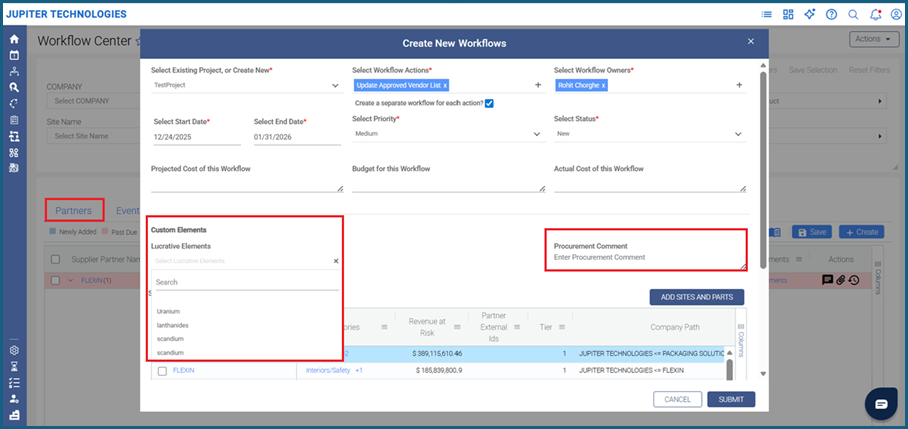
Let's take an example where a customer user wants to add custom columns to their workflow for suppliers, specifying Lucrative Elements with drop‑down values such as Uranium, Lanthanides, Scandium, Yttrium, and a Procurement Comment as a free‑text field, so that these fields appear directly in the Create New Workflows screen and can be used whenever a new workflow is created.
To introduce custom elements:
- Submit a request to customer support at customersupport@resilinc.aispecifying:
- The custom element names (for example, Lucrative Elements, Procurement Comment).
- The value types and options (for example, drop‑down values or free text).
- Configuration and availability:
- Once configured, the custom elements are added to your user interface.
- They become available during workflow creation and editing for the relevant entities (supplier, site, part, product, event).
Example: Lucrative Elements and Procurement Comment
- In this example, Lucrative Elements is configured as a drop‑down list containing values such as Uranium, lanthanides, scandium, yttrium, and other relevant options.
- Procurement Comment is configured as a free‑text entry so users can capture additional procurement‑related notes for each supplier directly within the workflow.
- When creating a new workflow, the Lucrative Elements drop‑down and Procurement Comment free‑text field appear as additional columns in the workflow setup grid, allowing teams to classify suppliers and record comments without leaving the workflow screen.
Behavior in workflows
- For suppliers included in the workflow, selected Lucrative Elements and entered Procurement Comments are displayed as values in the respective custom columns; for suppliers not selected, the columns remain visible but empty.
- These custom elements are non‑mandatory, so users can decide when to use them based on the requirements of each project or workflow.
Supported value types and maintenance
- Each custom element can be configured either as a multi‑select drop‑down (as with Lucrative Elements) or as a free‑text field (as with Procurement Comment), enabling both structured classification and flexible input.
- Drop‑down options and free‑text configurations can be updated even after a workflow is created, so Lucrative‑related values and procurement note fields can evolve with changing business needs.
Visibility across projects
- All workflows, including those that use Lucrative Elements and Procurement Comment, are listed on the Projects tab where the custom element columns are displayed for every workflow entity.
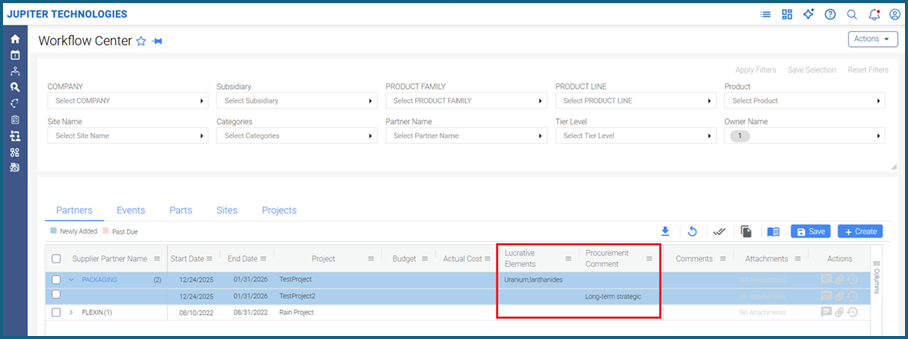
- This ensures that Lucrative‑related attributes and procurement notes are consistently available and reportable across all workflow types in your environment.
Was this article helpful?
That’s Great!
Thank you for your feedback
Sorry! We couldn't be helpful
Thank you for your feedback
Feedback sent
We appreciate your effort and will try to fix the article