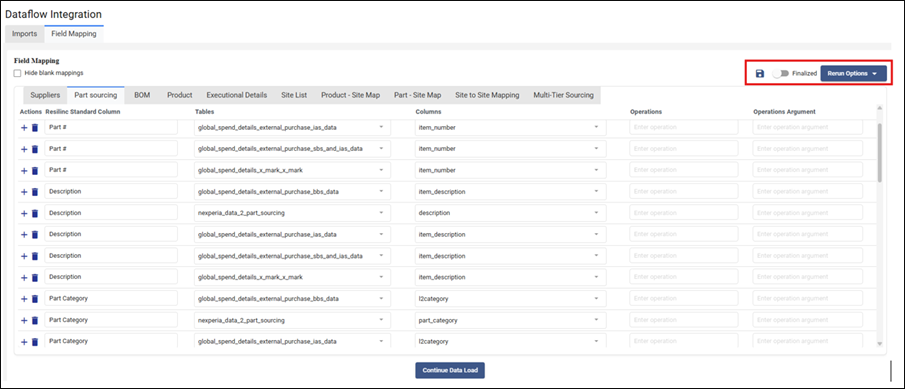
If the AI-generated mapping predictions do not match your intended data mapping, your Resilinc contact has two options available within the Field Mapping tab:
- Manual correction: Your contact can directly edit any row in the mapping grid to update the Resilinc standard column, source table, or source column to the correct values.
- Rerun the AI: Using the "Rerun Options" dropdown button, your contact can re-run the AI prediction engine for all mapping tabs at once, or for a specific tab only. This is useful when the initial predictions are significantly off and a fresh AI suggestion would be a better starting point.
- If neither manual correction nor a rerun resolves the issue, and a custom transformation or logic is required that does not exist in the platform's current library, your Resilinc contact will document the requirement and work with the Resilinc engineering team to build a custom function. Once available, it will be configured in the "Operation" and "Operation arguments" fields of the relevant mapping row.
Was this article helpful?
That’s Great!
Thank you for your feedback
Sorry! We couldn't be helpful
Thank you for your feedback
Feedback sent
We appreciate your effort and will try to fix the article