- After the Field Mapping step is complete and "Continue Data Load" is clicked, your data enters the Silver Layer, where it goes through two important checks:
- Supplier Name Normalization check: The system verifies that all supplier names in your source files match Resilinc's normalized supplier names. Any supplier names that are not yet normalized are flagged.
- Data field validation: The system checks each record across all mapped tabs for errors (records that cannot be loaded) and warnings (records that were loaded but may have data quality concerns, such as incomplete addresses or optional fields left blank).
- The import status will show as "In Progress - NN" (Normalization check) followed by "In Progress - Silver layer" (data validation) during this phase.
- To review the results:
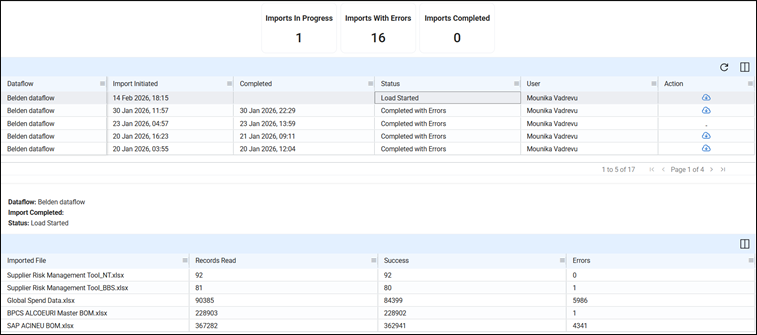
- In the "Imports" tab, click the Action column icon on the relevant import row to download a ZIP file containing a detailed error and warning report for your review.
- You can also click on the import row itself to expand a summary table below, which shows the count of errors per source file, helping you quickly identify which files need corrections.
- Correcting errors in your source files and re-running the import in a future dataflow is the recommended approach. Records with unresolved errors are withheld from the portal, while all valid records are still uploaded successfully.
Was this article helpful?
That’s Great!
Thank you for your feedback
Sorry! We couldn't be helpful
Thank you for your feedback
Feedback sent
We appreciate your effort and will try to fix the article